
 PL
PL  DE
DE  IT
IT  GR
GR  PT
PT  DK
DK  FR
FR  NL
NL  ES
ES  IN
IN  CA
CA  BR
BR  CH
CH  AU
AU  JP
JP  IE
IE 
 Sports Betting
  Live Betting
  Racing
  Slots
Slots  Live Casino
  Promotions
  VIP
VIP 
Vave Sportsbook and Casino App – The Best Crypto Betting on Mobile
Read our Vave App review covering crypto sports betting, casino games, live dealers, app download steps, features, and mobile performance.
Join NowVave Sportsbook and Casino App: Crypto Betting Built for Mobile Play
If you are looking for a gaming platform that works directly with crypto wallets instead of around them, then the Vave Sportsbook and Casino App is definitely worth a try! Vave is a crypto-only betting platform that combines sports betting, live betting, and a full online casino into a single mobile-focused app.
It’s designed for players who want quick access to markets, fast bet placement, and straightforward crypto withdrawals without unnecessary steps or delays. The app supports betting on over 40 sports, with hundreds of live events available at any given time.
On the casino side, the library includes more than 6,000 games, covering slots, live dealer tables, and instant-play titles. The mobile experience doesn’t feel scaled back compared to desktop use. Live casino games clearly display RTPs, player activity is visible across tables and slots, and the sportsbook bet slip updates instantly as selections are made.
Vave operates under a Curaçao licence, is owned by TechOptions Group B.V., and holds a verified operator certificate from the Crypto Gambling Foundation, which adds reassurance for crypto-first players. This review breaks down how the Vave app works, how to install it across devices, and which features actually matter once you start using the platform.
How to Download and Install the Vave App
Vave hosts all of its app files directly on the official website, which means you don’t need to rely on third-party app stores. The platform automatically detects the device and operating system you’re using, then serves the correct file for Android, iOS, or Windows. This keeps the process simple and avoids compatibility issues.
Android App Installation via APK
Android users can install the Vave App using an APK file. While APK installs may sound technical, the steps are straightforward and only take a couple of minutes.
To install the app on your Android device, follow these steps:
- Open the Vave website using your mobile browser.
- Tap the menu icon and select App Download.
- The site will automatically detect Android and ask to confirm the APK download.
- Download the APK file and tap it once the download completes.
- When prompted, allow installations from unknown sources for your browser.
- Confirm installation and wait for the app to install.
- Open the app, log in or register, and start using the platform.
Once installed, the app launches quickly and performs well even on budget and mid-range Android devices.

android app

iOS, iPadOS, and macOS Installation via IPA
Apple users can install the Vave App using an IPA file, which is delivered directly through the website, depending on the device being used. The same process applies across iPhone, iPad, and supported MacBooks.
To install the app on Apple devices:
- Visit the Vave website using Safari or another browser.
- Open the menu and tap App Download.
- The site detects your Apple device and downloads the IPA file.
- Follow the on-screen prompts to allow the app in your device settings.
- Trust the app when requested.
- Launch the app and sign in or create an account.
After installation, the app behaves like a native Apple application with full access to sportsbook and casino features.

IOS app

Windows Desktop App via Direct Downloader
For desktop users, Vave provides a dedicated Windows application through a direct installer. To install the Windows app:
- Open the Vave website on your Windows device.
- Click App Download from the menu.
- Download the installer file.
- Run the installer and complete the setup.
- Launch the app and log in.
This option suits players who prefer a full-screen desktop betting experience.
Progressive Web App (PWA) Option
If you don’t want to install a native app, the Vave PWA offers a lightweight alternative that works directly from your browser.
To install the PWA:
- Open the Vave website in Chrome or Safari.
- Tap the browser menu.
- Select Add to Home Screen.
- Confirm the prompt.
The PWA opens like an app, loads quickly, and doesn’t require additional storage or permissions.

App Requirements and Compatible Devices
The Vave App is designed to run smoothly across a wide range of devices without demanding high-end hardware. Both Apple and Android users can expect stable performance during sports betting and casino play.
Apple Devices
The Vave iOS App works well if your device meets the following requirements:
- OS: iOS 14.0 or newer, iPadOS 14.0 or newer, and macOS 12.0 or newer.
- Storage: 200 MB of free storage required.
- For PWA: Up-to-date Safari browser.
- Compatible Devices: iPhone 11 and newer models, iPhone SE, iPod Touch, and Apple MacBooks.
IOS app
Android Devices
Android users need the following to run the app properly:
- OS: Android 10.0 or newer.
- Memory: At least 2 GB of RAM.
- Storage: Around 200 MB of free storage.
- For PWA: Up-to-date mobile/native browsers.
- Compatible Android Phone (Brands): The app runs reliably on both budget and flagship phones from brands like Samsung, Oppo, Xiaomi, Google Pixel, OnePlus, and similar manufacturers.
android app
What to Do After Your First Login or Registration

After logging into the Vave App for the first time, it’s worth taking a few minutes to set up your account properly. Doing this early helps avoid friction later, especially when placing larger bets or withdrawing funds.
Start by completing your profile and confirming basic contact details in the account section. Even though Vave is a crypto-first platform, accurate profile information improves security and makes support interactions smoother if you ever need assistance.
Next, review your wallet and security settings. Since withdrawals go directly to crypto wallets, double-checking wallet details before betting seriously is a sensible step. Verification requirements are generally minimal, but completing any requested checks early can prevent delays.
For added protection, the app allows you to enable two-factor authentication (2FA) and device binding from the settings menu. Once these are active, you can use the sportsbook and casino without restrictions.

App Features and Benefits
Once you move beyond the initial setup, the Vave App starts to show what it’s really designed for. Rather than acting as a lightweight companion to a desktop site, the app delivers a full sportsbook and casino experience that holds up even during busy live betting periods.
All-In-One Super Gaming App
Vave brings sports betting, live betting, racing, slots, and live dealer games into a single mobile app that runs under one account and one wallet. This unified setup means you’re not moving funds around or switching interfaces as you jump between sportsbook markets and casino games.
Design, Navigation, and Overall Usability
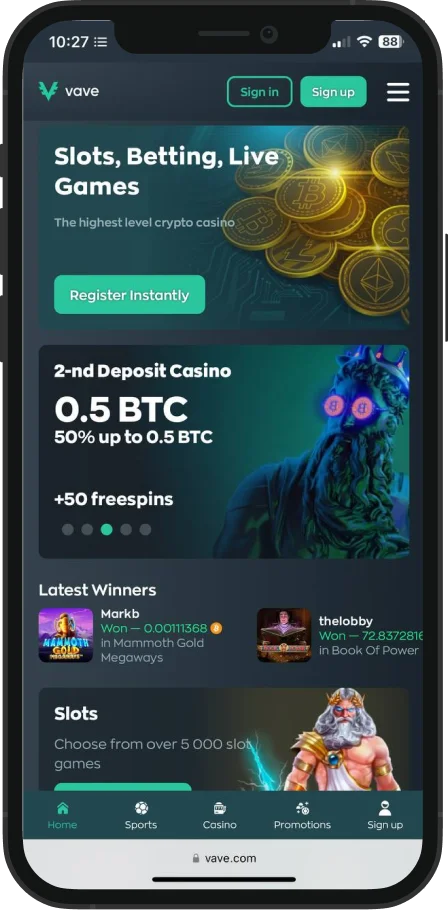
The app uses a dark, modern interface with neon-accented highlights that draw attention to key actions without cluttering the screen. The layout closely mirrors the desktop version, making navigation intuitive for existing Vave users, while remaining easy to pick up for new players.
A dynamic navigation bar keeps major sections such as sports betting, racing, slots, live casino, promotions, and leaderboards within easy reach at all times. Pages load quickly, filters respond smoothly, and the app stays stable even during busy live events.
Performance and Auto Switch to Lite Mode
From a performance standpoint, the app is designed to stay responsive even when network conditions change. VPN access is supported, and the interface automatically switches to a lite mode to adjust certain visual and loading elements based on your connection, so core functions remain uninterrupted.
Bonuses and Promotions on Mobile
Vave also makes its promotions fully accessible through the app, with bonuses available across both sportsbook and casino sections. Bonuses can be tracked directly from the promotions section in the app, where wagering progress and terms are clearly displayed.
Since the platform operates on a crypto-first model, bonuses are typically offered using different coin bases, most notably BTC and USDT, with clear fiat-equivalent values shown at the time of claiming.
Casino Library and Hot and Cold Slots Feature
Vave’s casino library includes over 6,000 games from more than 150 software providers, covering slots, live dealer games, and a wide range of instant-play titles. What makes the casino section feel more practical than most is how performance data is surfaced.
The Hot and Cold slots feature highlights how games are performing over a rolling 24-hour period. Instead of guessing, players can see:
- Hot slots, which are currently overperforming based on payouts, RTP behaviour, and recent activity.
- Cold slots, which are underperforming during the same time window.
Slots and live tables also show how many players are currently active, while live dealer games clearly display RTPs before you join a table. This level of transparency makes it easier to decide where to play without relying purely on trial and error.
Sports Betting Features and Live Markets
The sportsbook supports betting on more than 40 sports, with football, basketball, tennis, hockey, and horse racing drawing the most interest. Both pre-match and live betting are fully integrated, and it’s common to see over 100 live events available at peak times.
Bet slips update dynamically as soon as odds are selected, instantly showing potential returns. You can place unlimited single bets, build multi-bet accumulators, and switch between odds formats, including decimal, American, fractional, Malaysian, Hong Kong, and Indonesian. Live statistics and basic analytics are available for selected events to support in-play betting decisions.
Horse Racing Coverage
Horse racing is treated as its own category, rather than being folded into general sports betting. The app covers major racing regions and events, with races organised by location and start time. The interface stays simple, making it easy to place quick bets or follow multiple races without confusion.
Payments and Crypto Wallet Options
Vave operates as a crypto-first platform, with all withdrawals processed directly to cryptocurrency wallets. To make the platform more accessible, the app also allows users to buy cryptocurrency using cards or e-wallets in major fiat currencies such as USD, EUR, AUD, NZD, and CAD.
Players can link their own external crypto wallets, manage balances internally, and move funds instantly between sportsbook and casino sections. This setup removes many of the delays associated with traditional banking methods and keeps payments flexible.
Community Access and Vave Customer Support
Beyond betting, Vave offers multiple ways for players to stay informed and get help when needed. For account-related questions or urgent issues, the fastest option is the live chat feature inside the app, which connects you directly with support without leaving the platform. Live chat is easy to access from the menu and is designed for quick problem resolution.
Alongside direct support, Vave maintains an active community across social platforms such as Discord, Telegram, Instagram, and X. These channels are useful for following updates, discussing games, and seeing how other players interact with the platform.
There is also a regularly updated blog covering platform news, promotion details, casino guides, and betting strategy content, which is worth checking if you like staying informed beyond day-to-day betting.
Security and Account Protection
Security is handled at a high standard within the app. Vave uses SSL encryption to protect data, along with optional two-factor authentication and device binding to restrict account access to approved devices. These features can be enabled directly from the settings menu and add meaningful protection without making the login process feel heavy or inconvenient.
Mobile Web Version
For players who don’t want to install a traditional app, Vave also offers a fully functional mobile web version that can be used directly through your browser. The layout closely mirrors the native app, making it a practical option for quick sessions, shared devices, or players who prefer not to download files.
The mobile site runs smoothly on major browsers like Chrome, Safari, and Firefox, with no storage requirements. Sports betting, live betting, casino games, payments, and account settings are all accessible, and performance remains stable even during busy live events.
If you want an app-like experience without a full installation, the mobile web version can also be added to your home screen as a PWA. This option opens Vave in its own window, loads quickly, and avoids the need for APK or IPA files, making it a convenient middle ground between the browser and the native app.
Join Now
FAQs
Vave is not available in certain regions, such as the USA, UK, Israel, and Estonia. Some players choose to access the platform using a VPN, and withdrawals are processed to crypto wallets.
Yes, updates are rolled out through the same download method used for installation, ensuring compatibility and performance improvements.
All promotions available on the platform can be accessed through the app and mobile site.
Check your device requirements, storage space, and permissions, then retry the download from the official website.

Responsible Gaming
Vave encourages responsible play and provides tools to help users stay in control. Players are advised to set personal limits, take regular breaks, and only gamble with funds they can afford to lose. If betting stops being enjoyable, stepping away or seeking external support is always the right choice. Gambling should remain a form of entertainment, not a financial solution.
